MCP servers are your agents' third-party scripts

Web teams learned the hard way that the code running on their checkout page isn't all theirs. A modern page pulls in scripts for payments, analytics, chat and A/B testing, each fetched at runtime from a server someone else controls, and any of them can change without warning. In 2018 attackers altered one JavaScript file on British Airways' booking site and skimmed card details from more than 400,000 customers. In 2024 the new owner of the polyfill.io domain started serving malicious code to more than 100,000 websites that had embedded it years earlier and forgotten about it.
AI agents are setting up the same situation with MCP. An agent's capabilities are whatever tools its MCP servers return from tools/list right now. Some of those servers are yours, many aren't, and the tool definitions can change on the server side without anyone on your team touching anything.
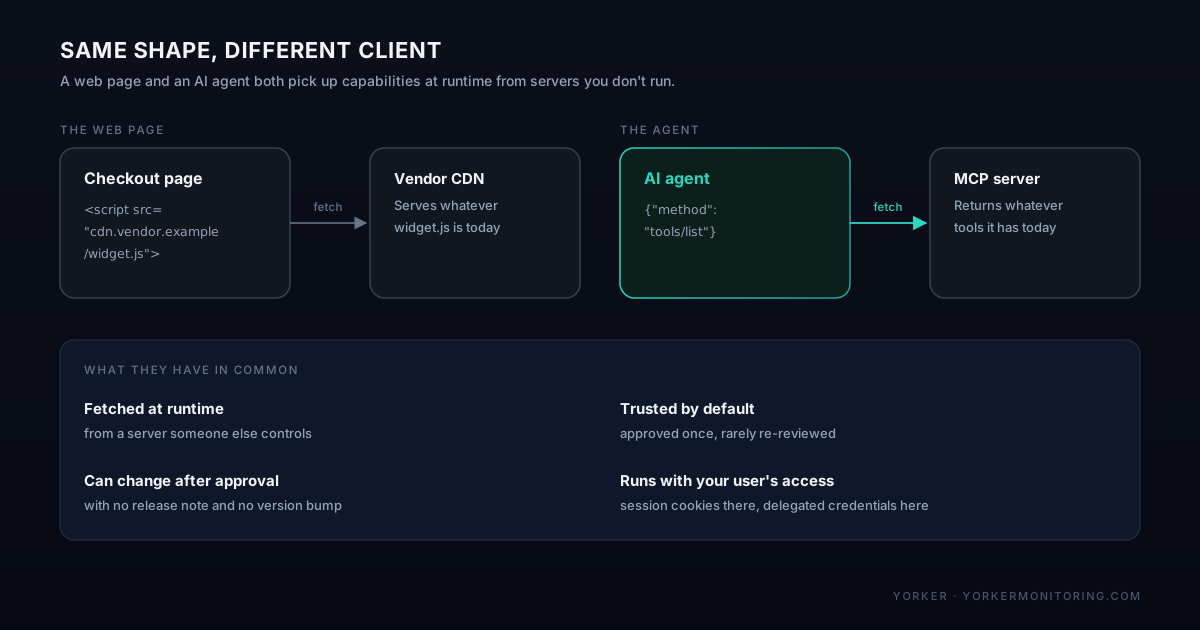
The parallel is closer than it looks
A third-party script and a third-party MCP tool share four properties, and those four are what made client-side supply chain attacks work.
- Fetched at runtime. The page doesn't bundle
widget.js; it asks the vendor's CDN for whateverwidget.jsis today. An agent doesn't ship with its tools; it asks the MCP server what tools exist every time it connects. - Trusted by default. Someone approved the script tag once, in a pull request that's now two years old. Someone approved the MCP server once, when they added it to the agent's config. Nobody re-reviews either on every load.
- Can change after approval. The vendor can push a new script with no release note. The MCP server can add a tool, remove one, or change a tool's parameters with no version bump.
- Runs with your user's access. A script runs in the user's session, with their cookies and their view of the page. A tool call runs with whatever credentials the agent was given to act on that user's behalf.
The failure modes follow from that. A script that starts sending form data to an unfamiliar domain has an equivalent in a tool that gains an extra parameter, or a new tool that shows up on a server your agents already trust.
What a rug pull looks like
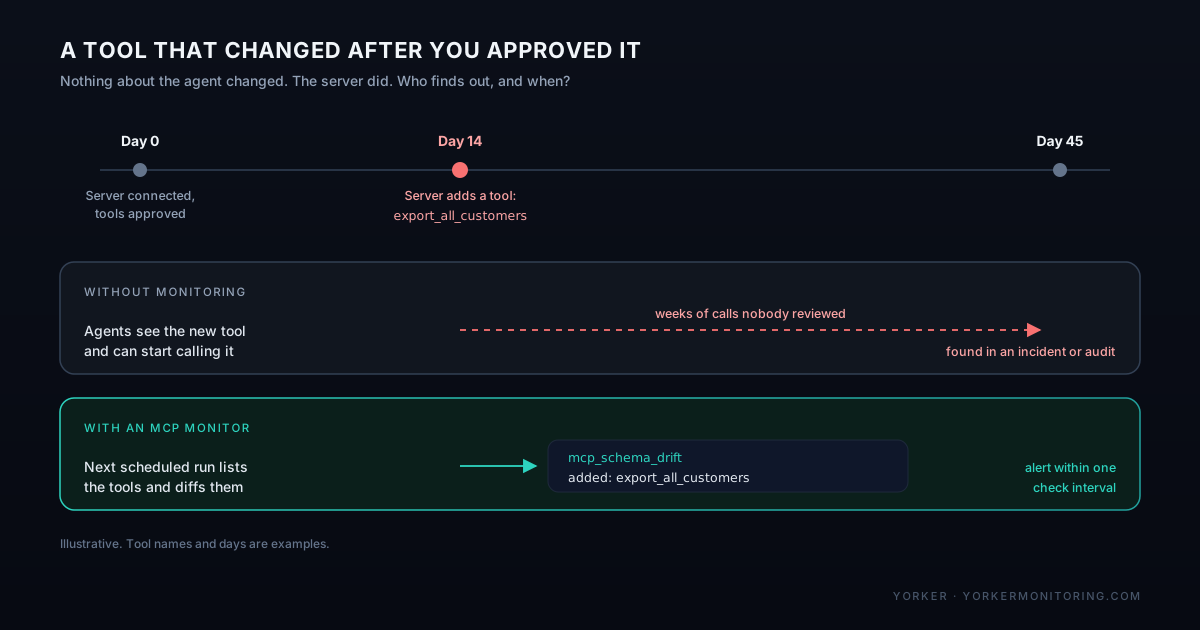
In April 2025 Invariant Labs published research on tool poisoning and "rug pull" attacks against MCP. The rug pull is the simplest version: a server behaves well while you evaluate it, then changes its tools after clients have approved it.
It doesn't need a malicious vendor, either. A third-party server gets a new maintainer, a dependency gets compromised, or someone ships a feature to a shared internal server without thinking about which agents are connected to it. The effect on your agent is the same in every case: its capabilities changed, and nothing in your own deploy pipeline recorded that they did.
The web already worked out the controls
None of this needs new thinking. The web built a set of controls for third-party scripts over the last decade, and PCI DSS 4.0 turned several of them into audit requirements for payment pages. Each one has a direct MCP equivalent.
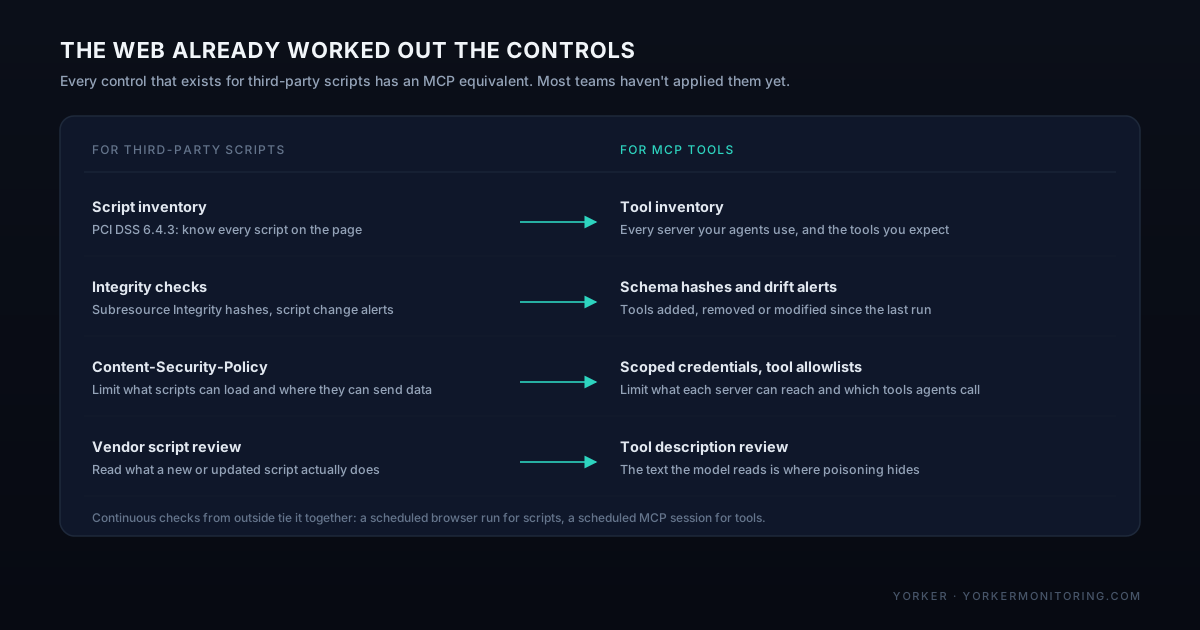
- Inventory. PCI DSS requirement 6.4.3 asks for a list of every script on a payment page and a reason for each. Do the same for agents: every MCP server they connect to, who runs it, what credentials it holds, and which tools you expect it to expose.
- Integrity. Subresource Integrity pins a script to a hash, and change detection alerts when a script moves. For MCP, hash each tool's definition and alert when a tool is added, removed or modified.
- Least privilege. Content-Security-Policy limits what a script can load and where it can send data. For MCP, give each server the narrowest credentials that work, and where your client supports it, allowlist the tools an agent may call instead of accepting everything a server offers.
- Review. Nobody should add a new vendor script without reading what it does. Tool descriptions deserve the same treatment, because the description is the text the model reads to decide what a tool is for and when to call it.
What makes all of that hold up over time is checking continuously from the outside, the way a synthetic browser check loads the payment page every few minutes and diffs what it finds.
Watching an MCP server the way you'd watch a script
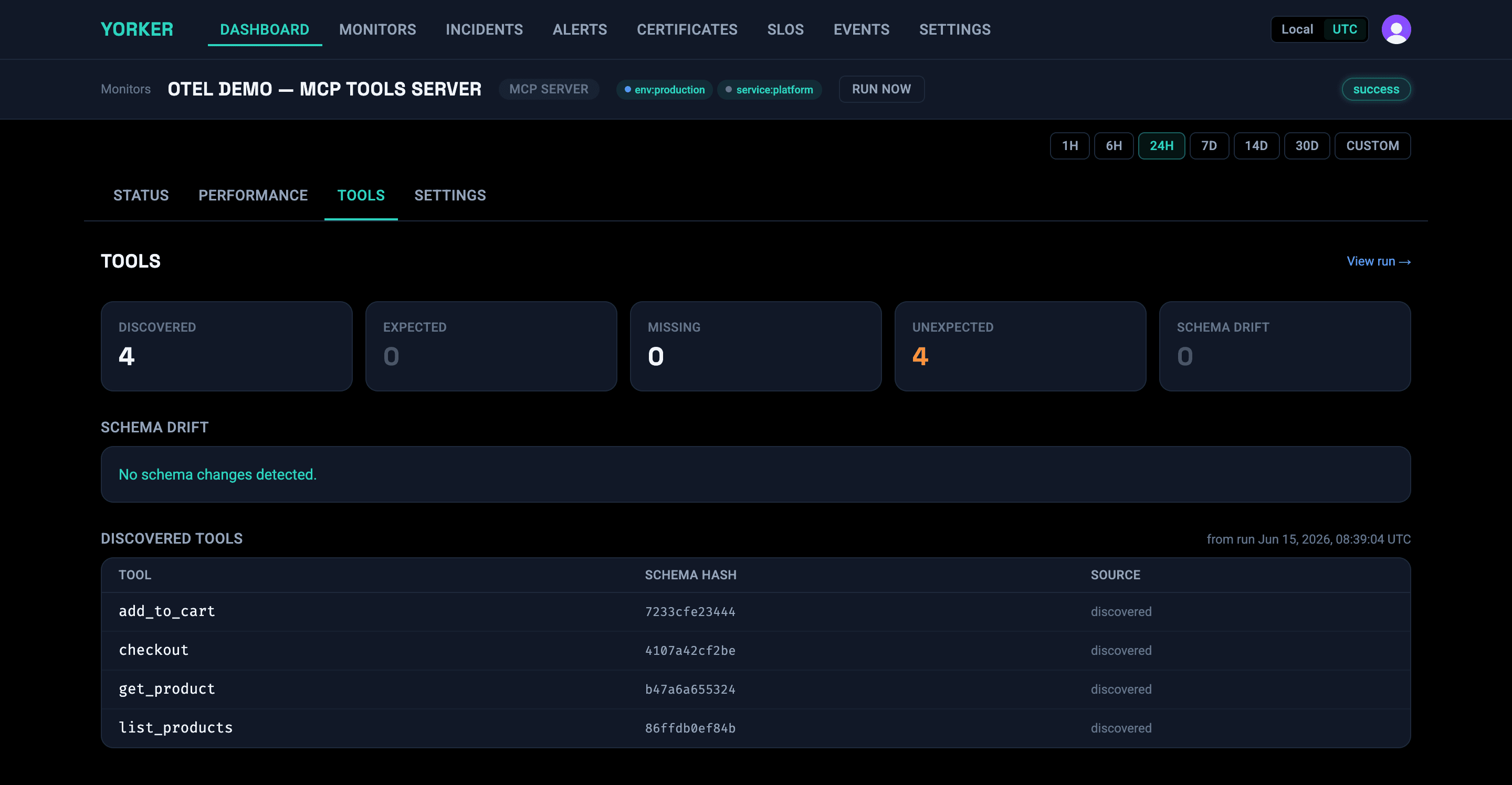
A synthetic MCP monitor does for tools what a scripted browser does for a page: it connects as a client on a schedule and records what it gets back. In Yorker, an MCP monitor runs the initialize handshake, calls tools/list, makes any test calls you configure, and stores a hash of each tool's input schema. Each run is compared with the last one, and any tool that was added, removed or modified is recorded as schema drift.
# yorker.config.yaml
monitors:
  - name: "vendor CRM MCP server"
    type: mcp
    endpoint: https://mcp.crm-vendor.example.com/mcp
    frequency: 5m
    detectSchemaDrift: true
    auth:
      type: bearer
      token: "{{secrets.CRM_MCP_TOKEN}}"
    expectedTools:
      - get_customer
      - list_invoices
    alerts:
      - conditions:
          - type: mcp_schema_drift
            changeTypes: [added, modified]
            severity: critical
        channels:
- "@security-slack"The mcp_schema_drift condition can be narrowed to specific change types or specific tool names, so a new tool on a server that holds customer data can page someone while a harmless change on an internal docs server just leaves a note. Drift also goes out as a check.mcp_schema_drift OpenTelemetry log event, so if your security team collects telemetry, the change can land next to their other signals instead of only in a monitoring dashboard.
Access control is worth checking the same way. An MCP endpoint that accepts sessions with no credentials is open to anyone who finds the URL. A plain HTTP check that sends an initialize request with no auth header and expects a 401 turns "this server requires auth" into something verified every few minutes rather than assumed:
  - name: "CRM MCP rejects anonymous sessions"
    type: http
    url: https://mcp.crm-vendor.example.com/mcp
    method: POST
    headers:
      Content-Type: application/json
      Accept: "application/json, text/event-stream"
    body: '{"jsonrpc":"2.0","id":1,"method":"initialize","params":{"protocolVersion":"2025-03-26","capabilities":{},"clientInfo":{"name":"auth-probe","version":"1"}}}'
    frequency: 5m
    assertions:
      - type: status_code
        operator: equals
value: 401A starting checklist
- List every MCP server your agents connect to, including the ones someone added to a local config to try out. Note who runs each one and what credentials it holds.
- Write down the tools you expect each server to expose, and alert when that list changes.
- Treat a new tool on a server with write access or customer data as a security event.
- Review tool descriptions when you add or upgrade a server, and keep a copy so you can diff them.
- Scope credentials per server, and allowlist tools in the client where you can.
- Verify that every MCP endpoint you run rejects anonymous sessions, and keep verifying it.